PariPesa Rwanda payment methods and limits
Use the RWF cashier in your PariPesa account. MTN Mobile Money and Airtel Money are the main local deposit methods. Both accept RWF 200–100,000. Deposit and withdrawal limits are separate.

| Method | Deposit | Withdrawal | Before confirming |
|---|---|---|---|
| MTN Mobile Money | RWF 200–100,000 | RWF 6,000–1,290,000 | Use the MTN line linked to your account |
| Airtel Money | RWF 200–100,000 | RWF 6,000–1,290,000 | Check the +250 Airtel number and name |
MTN and Airtel withdrawals have no listed fee and a 15-minute processing estimate. Account review or payment-network delays can extend that time. Other methods use their own currencies and limits.
Before paying: account and bonus checks
- Log in through the operator page, confirm that the wallet and amount are shown in RWF, and use a phone number you control.
- Complete any phone or identity verification requested in your own account. The cashier’s name and number should match the account holder.
- Read an active bonus offer’s qualifying deposit and wagering rules before paying. The RWF 200 cashier minimum is a payment limit and does not by itself activate a welcome offer.
- Keep access to your mobile-money device so you can review and approve a request. Enter a mobile-money PIN only in the provider’s own phone prompt, never into a page or chat requesting it.
How to deposit with Airtel Money
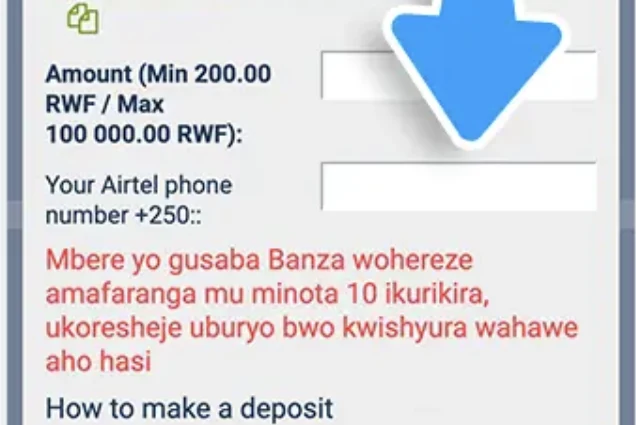
The Airtel deposit form has an amount field marked Min 200.00 RWF / Max 100,000.00 RWF and a separate field for Your Airtel phone number +250. Its Kinyarwanda instruction sets a ten-minute window to complete the payment.
- Sign in and choose Deposit. Open the cashier and select Airtel Money from the available methods.
- Enter the RWF amount. Use RWF 200–100,000. Review any bonus offer attached to a preset amount.
- Enter the Airtel number. The form supplies +250; check that the remaining digits identify the Airtel Money line you control. Do not duplicate the prefix.
- Submit and follow the exact instruction shown. Complete any provider prompt on your phone or the payment route displayed in the cashier within its stated window. Check the amount and recipient before authorising on the device.
- Verify the result. Return to your PariPesa balance and transaction history. Save the provider confirmation or transaction reference. If the request remains pending, check its status before sending again.
How to deposit with MTN Mobile Money
Choose MTN in Deposit and enter RWF 200–100,000. Add the MTN number requested by the form, confirm the amount and approve the mobile-money request on your device. Return to your account to verify that the balance has updated, and keep the transaction reference.
MTN and Airtel Money withdrawals
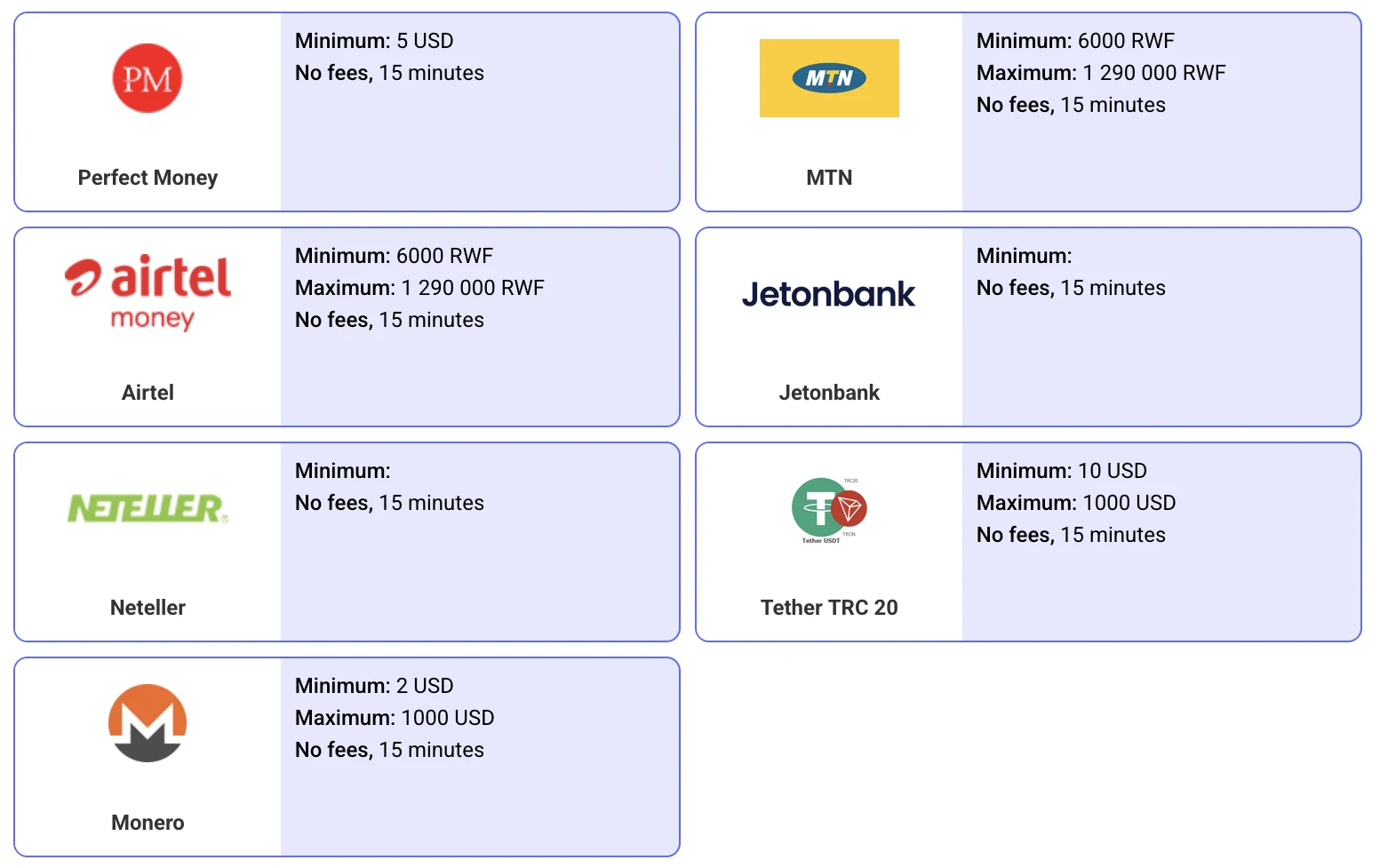
MTN and Airtel Money withdrawals range from RWF 6,000 to RWF 1,290,000, with no listed fee and a 15-minute processing estimate. Perfect Money, Jetonbank, Neteller, Tether TRC20 and Monero are also available.
Airtel withdrawal form: what to enter
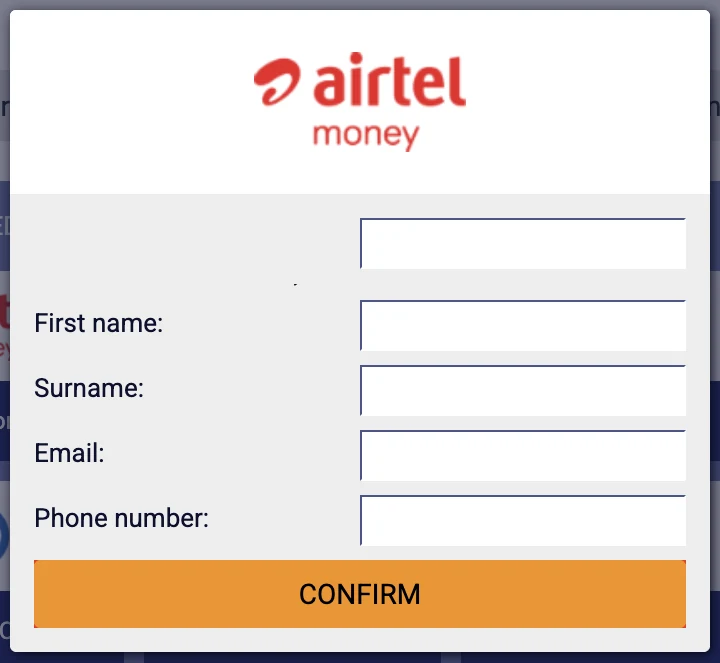
Select Withdraw → Airtel Money. The form starts with the amount, followed by First name, Surname, Email and Phone number, then Confirm. Use the registered account-holder details and the Airtel Money number you want to receive the funds on.
- Check the withdrawable balance. An active bonus, unsettled wager or verification request may affect what can be withdrawn.
- Choose Withdraw and the intended method. For MTN or Airtel, enter RWF 6,000–1,290,000.
- Fill in the recipient form. Enter the amount and the requested first name, surname, email and phone number. Correct a mismatch in your account details before sending a request.
- Review and confirm. Check the destination line and amount, select Confirm, then follow any verification displayed in the account.
- Track the request. Watch the withdrawal history and mobile-money account. Keep the request reference if the status remains pending, is rejected or requires support.
Other payment options
E-wallet and crypto withdrawal options include Perfect Money (minimum USD 5), Jetonbank, Neteller, Tether TRC20 (USD 10–1,000) and Monero (USD 2–1,000). Bank routes are available in the cashier too. Select the method you intend to use and follow its currency, beneficiary and transaction instructions.
For crypto, choose the exact asset and network displayed by the operator and compare the full destination address. Crypto transfers can be irreversible, and PariPesa disables bonuses for cryptocurrency accounts.
If a payment is pending or rejected
- No phone prompt: check the mobile network, entered +250 number and the provider’s transaction status. Do not repeat a pending deposit blindly.
- Deposit not credited: record the amount, method, time, provider reference and account transaction status before contacting PariPesa support through your account.
- Withdrawal unavailable: review the RWF minimum, account verification, registered recipient details, active bonus and withdrawable balance.
- Withdrawal delayed: the 15-minute card is an estimate. Keep the request ID and ask support which account or payment-provider step is pending.
MTN and Airtel deposits range from RWF 200 to RWF 100,000. Review the amount, phone number and payment details in the cashier before authorising a transaction.