How to Log In to PariPesa Rwanda
Open PariPesa through the button below, then select Log in on the operator page. The login form accepts a Rwanda +250 phone number or an ID or Email option. Use the method linked to your existing account.
OPEN PARIPESA · SELECT LOG IN ↗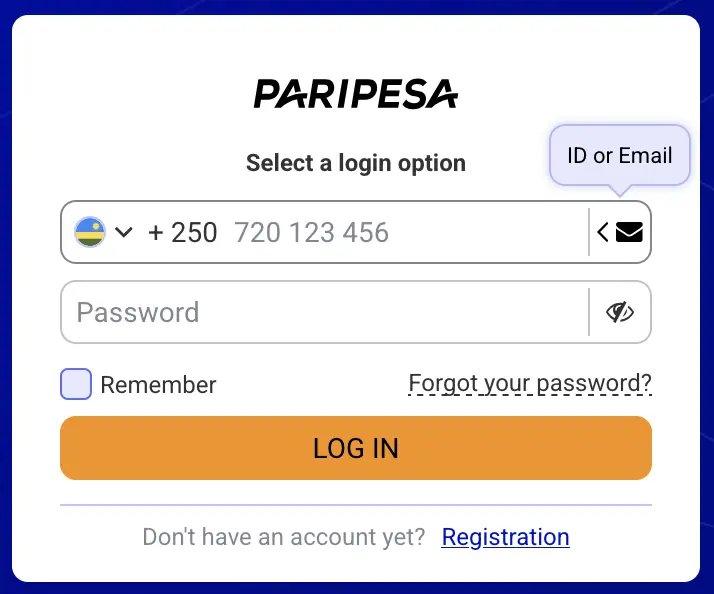
- Open the operator page using the button above and choose Log in if the sign-up form appears first.
- Choose your login option. Enter your registered number with the Rwanda +250 prefix, or switch to ID or Email if that is how you access your account.
- Enter your password in the operator’s password field. Use the eye icon to check what you typed if needed; avoid revealing it on a shared screen.
- Decide whether to use “Remember.” Leave it off on a shared or public device. Select Log In to submit.
New to PariPesa? The login form includes a Registration link. Use the Rwanda sign-up steps above to check the +250 number, RWF currency and BSR code before creating an account.
When login does not work
First check whether the form is set to phone or ID/email. If using a phone number, confirm the +250 prefix and avoid typing it twice. Check for spaces, then re-enter the password carefully. The operator’s recovery link is the right path for a forgotten password; neither this guide nor anyone in chat should ask for your password or one-time code.
After you sign in
Open account settings to review your completed profile, contact details, bonus preferences and pending verification requests. If a login confirmation appears for a new device, use only the verification process shown inside PariPesa. Sign out on shared devices and leave “Remember” unchecked there.